
learn · folders · 07
The swarm folder CRDT
The swarm folder is one folder that every device writes to, with no server. Its listing is a state-based CRDT: devices swap whole manifests and merge them, and concurrent edits keep both versions.
What a CRDT is
A conflict-free replicated data type (CRDT) is a data structure that several machines can change independently, without coordinating, and that always converges once they have seen the same changes. A state-based CRDT does this by sending its whole state and merging. The merge has to give the same result whatever order states arrive in, however often the same state arrives, and however states are grouped. Then any two replicas that have merged the same states hold the same value, without locks or a leader.
That fits devices that are often apart: a phone edits on a train, a laptop edits at home, and they reconcile when they next meet.
The manifest
The swarm folder’s listing is a manifest: a map from path (like trips/notes.md) to an entry. Every device keeps a full copy on disk (<storage_path>.swarm.json). An entry holds:
- the kind (file or folder), and for files the root CID, size and mtime;
- a version
(clock, device): a Lamport clock and the node ID of the device that made this version; - a history of the last 8 versions this one replaced;
- a
deletedflag, and the author’s nickname (for display).
File bytes are not in the manifest. An entry only names the file’s root CID, and the blocks stay on the device that added the file until someone opens it.
Lamport clocks. Each device keeps a counter that is always above every version it has seen. A local edit (add, change, delete) sets the counter to counter + 1 and stamps the entry with (counter, this device). If version A was made by a device that had already seen version B, A’s clock is higher. Ties between devices are broken by comparing device IDs, which gives every pair of versions the same order on every device.
Merging two versions of a path
When a device receives an entry for a path it also has:
- Same version. Nothing to do.
- One descends from the other. The incoming version lists the local one in its history (or the other way round). It is the newer edit and it wins.
- Neither does. The two edits were made without seeing each other: they are concurrent. Then:
- an edit beats a delete: if one side deleted the file and the other edited it, the edited file stays;
- two deletes: the higher version wins (the file stays deleted);
- two edits: both are kept. The higher version keeps the path. The other moves to
name (conflict from <author>).ext, named after the device that made it.
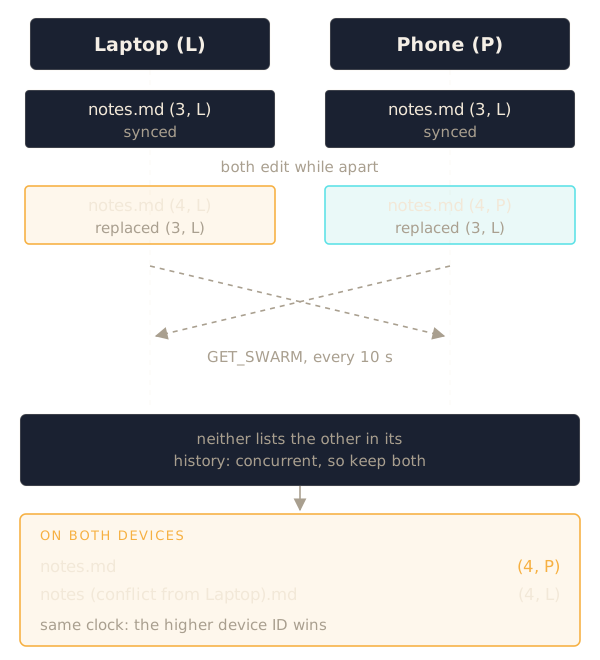
Every device computes the same conflict name from the same two entries, so the swarm agrees on the outcome without talking about it. No edit is lost.
Deletes are tombstones. Deleting a file doesn’t remove its entry. It records a new version with deleted set. The deletion then replicates like any other edit, and a device that was offline can’t bring the file back by sending its old copy: the tombstone descends from that copy and wins. NomadFS keeps tombstones and doesn’t clean them up yet.
Moves and renames are two edits: a new entry at the new path with the same CID, and a tombstone at the old one. Moving a folder does this for every entry under it.
Syncing
Every 10 seconds each device asks every peer it knows for its manifest (GET_SWARM), merges each entry, and saves the result if anything changed. Syncing only pulls: each device fetches what it is missing. Because the merge doesn’t depend on order, it doesn’t matter who syncs with whom first. Changes spread through any chain of devices that meet.
A peer’s manifest is checked before merging. One with more than 100,000 entries is refused. Each entry needs a path of at most 1,024 bytes and 32 levels made of valid names, or it is dropped, and author names are cut to 64 bytes.
Reading a swarm file
To read a file, NomadFS walks its tree from the root CID, fetching blocks it doesn’t have: first from the device that made the entry’s version, then from every other known device. Since every block is checked against its CID, any copy of a block is as good as the original.
Backup devices
If only the device that added a file has its blocks, the file can’t be read while that device is off. A backup device (swarm_backup = true, or the switch in the app) fixes that: every 10 seconds it copies, block by block, every live file in the manifest that it doesn’t hold in full yet. It asks the file’s author first, then any other device. Other devices need no setting: when the author is offline they try every known device, and the backup has the blocks.
The backup remembers which file roots it has copied in full (<storage_path>.swarm.json.backup), so a restart doesn’t check everything again. Blocks of deleted or replaced files stay on it: nothing reclaims that space yet.
Source: src/fs/manifest.zig, src/fs/swarm.zig.