
learn · folders · 08
FUSE, no libfuse
On Linux NomadFS mounts every device's shares and the swarm folder as an ordinary folder. It speaks the kernel's FUSE protocol itself, on /dev/fuse, with no library in between.
What FUSE is
FUSE (Filesystem in Userspace) lets an ordinary program implement a filesystem. The kernel’s FUSE module turns every operation on the mounted folder (look up a name, list a folder, read some bytes at an offset) into a request message. A user-space process reads that message from the device file /dev/fuse, does the work, and writes back a reply. The program that issued the call sees an ordinary filesystem. sshfs, rclone mount and many others work this way.
Most FUSE filesystems use libfuse, a C library that hides the protocol behind callbacks. NomadFS doesn’t. Its driver (src/fs/fuse.zig) reads and writes the kernel’s binary protocol directly: fixed C-layout structs from linux/fuse.h, protocol version 7.31. It needs neither libfuse nor libc, and the whole driver is one Zig file you can read.
Mounting without root
Mounting normally takes root. FUSE’s standard way around this is the setuid helper fusermount3, from the fuse3 package:
- NomadFS creates a Unix socket pair and runs
fusermount3with one end in the environment variable_FUSE_COMMFD. fusermount3opens/dev/fuse, mounts it on your folder (optionsnosuid,nodev,default_permissions,fsname=nomadfs), and sends the open file descriptor back over the socket (SCM_RIGHTS).- NomadFS receives the descriptor and starts serving requests on it.
To unmount, NomadFS runs fusermount3 -u -z (a lazy unmount: the kernel detaches the folder once nothing is using it). It does this on Ctrl-C, on SIGTERM, or when you switch the mount off in the app.
The read path
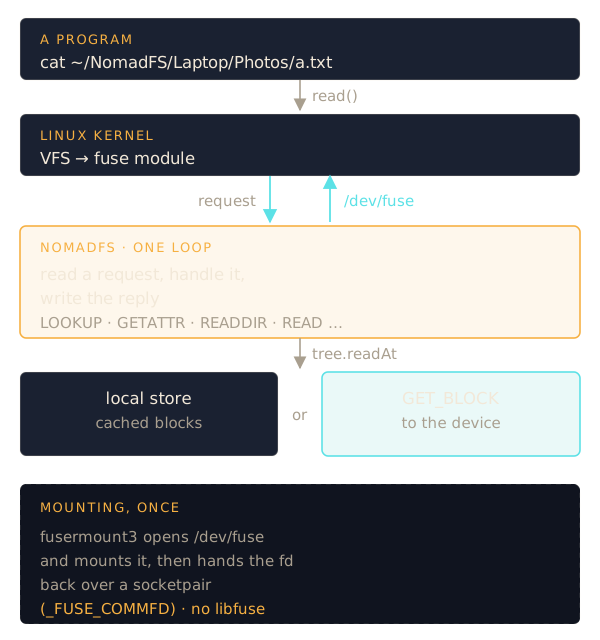
The mount shows <mount>/<device>/<share>/… for every reachable device, and <mount>/Swarm. NomadFS runs one loop: read a request from /dev/fuse, handle it, write the reply.
- LOOKUP / GETATTR turn a name into an inode and its attributes. Each path keeps its inode number for the life of the mount. Device folders come from the devices NomadFS can reach, and share folders from their
GET_SHARESlisting. - READDIR on a share folder is one directory block from the Merkle DAG, fetched with
GET_BLOCKthe first time and from the local store after that. - READ calls
tree.readAtfor the requested range. Only the blocks that cover those bytes are loaded, each checked against its hash.cat, a video player that seeks, orcpall work the same way.
Shares are read-only: files show as 0444, folders as 0555, and writes fail with EROFS. The kernel is told to cache attributes and names for one second, so changes on other devices show up quickly.
The write path: the swarm folder
<mount>/Swarm is writable. But a swarm file is a tree of hashed blocks, and you can’t change one byte of it in place. NomadFS stages writes in an ordinary file and turns the result into blocks when the file is closed.
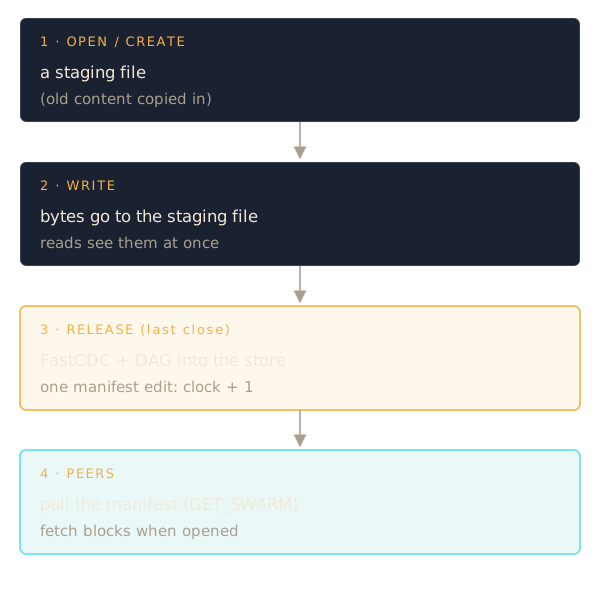
- OPEN for writing, or CREATE. NomadFS makes a staging file next to the manifest (
<storage_path>.swarm.json.staging/). Opening an existing file withoutO_TRUNCfirst copies its current content in, fetching blocks from other devices if needed, so appends and in-place edits work. - WRITE goes straight into the staging file with
pwrite. While the file is open, READ is served from the staging file too, so a program sees what it just wrote. - RELEASE (the last close) commits. The staging file is chunked with FastCDC, its blocks go into the local store, and the manifest gets one new version of the path. Other devices never see half a write, however many
writecalls it took. - Within about 10 seconds the other devices pull the new manifest (
GET_SWARM) and see the new version. They fetch its blocks only when someone opens it.
The other operations become manifest edits directly: mkdir adds a folder entry; unlink and rmdir write tombstones (rmdir is refused while the folder has anything in it); rename is a move. That covers the editor trick of writing a temporary file and renaming it over the original. A truncate without an open file is staged and committed at once. Moving a file between the swarm folder and a device’s share fails with EXDEV, as a move between two filesystems does.
Limits
- Linux only. The mount uses Linux’s
/dev/fuseandfusermount3; other platforms use the app. - Requests are handled one at a time, in order. A read that has to fetch a block from a slow device holds up the requests behind it.
- Extended attributes are not supported (
ENOSYS).
Source: src/fs/fuse.zig, src/fs/tree.zig, src/fs/swarm.zig.