
learn · storage · 06
Merkle DAG
Chunks are linked into trees of hashes: a file is a tree of blocks, and a folder is a tree of files and folders. A reader walks from the top CID down to the one block it needs.
What a Merkle DAG is
A Merkle tree is a tree in which each node is named by the hash of its contents, and those contents include the hashes of its children. The name of the root therefore commits to everything below it. Git commits, Bitcoin blocks and IPFS all use one. DAG (directed acyclic graph) is the general form: since nodes are named by content, two parents can point at the same child, and identical subtrees are stored once.
NomadFS uses three kinds of block, each starting with a tag byte:
| Tag | Block | Contains |
|---|---|---|
0x00 | leaf | the raw bytes of one chunk |
0x01 | parent | a list of links: child CID (32 B), subtree size (8 B), name |
0x02 | directory | a list of entries: CID, size, kind (file or dir), mtime, name |
All integers are big-endian, and a block’s CID is the SHA-256 of these bytes.
Files
FastCDC cuts a file into chunks, and each chunk becomes a leaf. A parent block then links up to 174 leaves, in order, each link recording the number of bytes under it. A file with more than 174 chunks (about 43 MiB at the 256 KiB average) gets another level of parents over the first, and so on until one block is left on top. That block’s CID is the file’s root. A file of one chunk is just that leaf, and an empty file is an empty leaf.
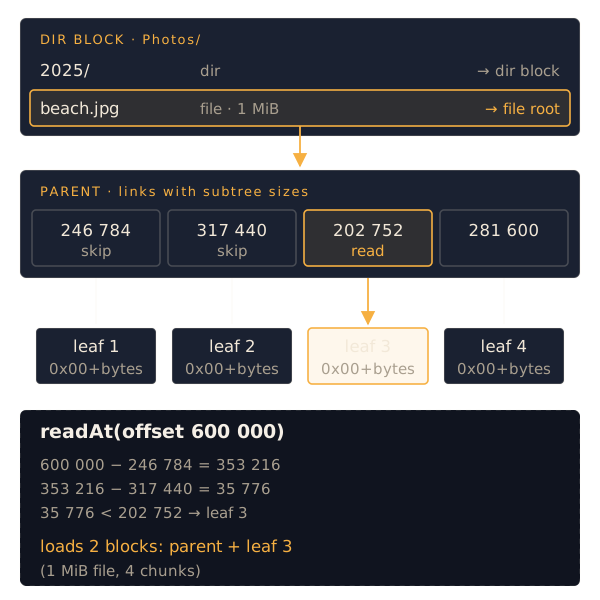
Reading a range
The sizes in the links mean a reader never scans the whole file. To read from byte offset p (tree.readAt):
- Load the root. If it is a leaf, copy from it.
- If it is a parent, walk its links: while p is at least the link’s size, subtract the size and move on. The first link where p is smaller is the subtree holding the byte.
- Load that child and repeat.
A read costs one block per level of the tree plus the leaf, whatever the size of the file: two blocks for anything under about 43 MiB. Seeking in a film on another device fetches the parent (once, then it is cached) and the chunk at the seek point, not everything before it.
Folders
A directory is one block listing its entries. Each entry has a name, a kind (file or dir), a size (the file’s length, or the total under a subfolder), a modification time and a CID: a file’s root, or the directory block of a subfolder. Entries are sorted by name, and names are checked: at most 255 bytes, no /, \ or NUL, never . or ... A listing from a peer can then be mapped onto a local filesystem without escaping it, and a given directory has exactly one encoding, so one CID.
Browsing another device’s share is a walk down this tree:
GET_SHARESreturns a directory block whose entries are the device’s shares, each pointing at the share’s top directory.- Opening a folder is one
GET_BLOCKfor its directory block. Listing a folder of large videos costs the same as listing a folder of text files. - Opening a file walks from its root as above.
Every block fetched on the way is checked against its CID and cached, so the tree you walked once can be walked again offline.
Scans and changes
A shared folder is scanned into this tree when it is shared and again every 30 seconds. A file whose size and modification time match the last scan is not read again; its CID is reused. When something changes, only the blocks on the path from that file up to the top are new: its leaves (only the chunks that changed), its parents, and the directory blocks above it. The share’s top CID changes, and peers see the new tree the next time they list it.
The filestore: shares are not copied
Copying every shared file into the block store would double the disk space used. For shared folders NomadFS doesn’t store leaves. While scanning, it records where each leaf’s bytes are, as (file, offset, length), and stores only the parent and directory blocks, which are small.
When a peer asks for a leaf, the block store finds no file for it and asks the filestore. The filestore reads those bytes from the original file and hashes them again. If the file has changed since the scan, the hash no longer matches and the block is reported as missing, never sent wrong. The next scan records the new content.
Files in the swarm folder are different: they belong to the swarm rather than to a folder on one device, so their blocks are stored in full in the block store of the device that added them.
Source: src/storage/dag/codec.zig, src/storage/dag/builder.zig, src/fs/tree.zig, src/fs/scan.zig, src/fs/filestore.zig.